
If your treasurer asks for the same contribution report every month, automate it.
In CiviCRM, the simplest path:
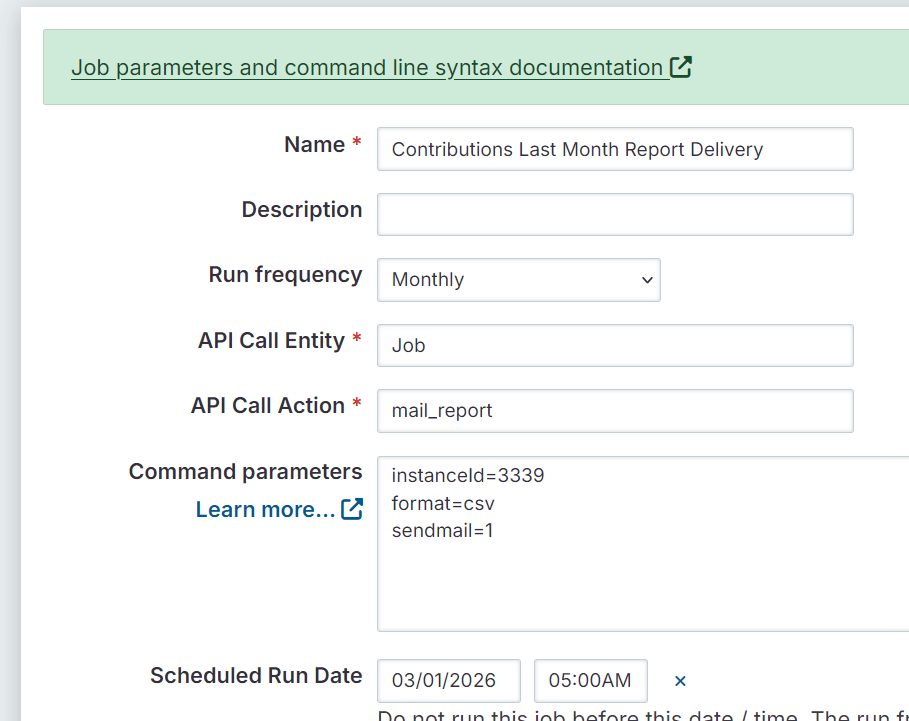
Build the contribution report in CiviReport > enable Email Delivery > create a Scheduled Job for it.
Now it lands in their inbox. Every month. No exports. No reminders. I just had a client needing this for their monthly reporting.
I use SearchKit for more and more reporting. But when you need scheduled email delivery, CiviReport is still the tried and true, simplest solution. There’s no native “email this SearchKit result monthly” button (though if you’re feeling industrious you cansetup up a cron task that uses a Search Display.
A few gotchas to remember:
- Again, you need to setup a Job.mail_report scheduled job. Administer > System Settings > Scheduled Jobs > Add New.
- Only one address allowed in “To”
- Multiple allowed in CC
- Use an alias like
treasurer@example.orgfor To address if several people need it
The point isn’t adding complexity. It’s choosing the right tool for the outcome.
Sometimes that’s SearchKit. Sometimes it’s CiviReport.
Sometimes it depends on user skill level, data complexity, or whether the report needs to be logged into — or simply emailed.
Context drives the decision. More on reporting, aka finding what you need, next.